


Your company name is the first thing customers, banks and investors will know you by — and under the Companies Act, 2013, it has to be unique. Before you fall in love with a name, it makes sense to check whether it is actually free to use.
The good news: the Ministry of Corporate Affairs (MCA) gives you a free tool to do exactly that. This guide shows you, in simple steps, how to check company name availability on the MCA portal in 2026, how to read the results, the naming rules that apply, and how to reserve your name once it’s clear.
Why a company name check matters
A quick company name check at the start saves you real time and money later. Here’s why it’s worth doing before anything else:
- It prevents rejection. If your proposed name is identical or too similar to an existing company or LLP, the Registrar of Companies (ROC) will reject your application — and you lose the fee and the days spent.
- It keeps you compliant. Every name must follow the Companies Act, 2013 and the naming rules. An early check helps you avoid restricted words and formats that get refused.
- It protects your brand. A distinct name avoids clashes with existing businesses and trademarks, so you don’t have to rebrand a year later.
How to check company name availability on the MCA portal
The MCA moved to its new V3 portal, so the steps below reflect the current 2026 process. The MCA “Check Company/LLP Name” tool is free, and you don’t need to log in just to run a search.
Step 1 — Open the MCA portal
Go to www.mca.gov.in. A laptop or desktop browser works best, as the name search results are easier to scan on a larger screen.
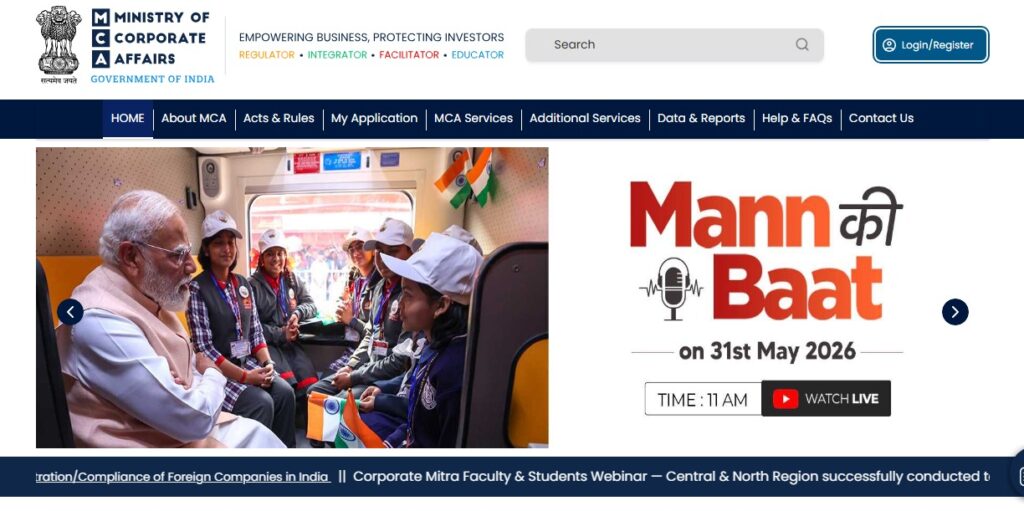
Step 2 — Open the name-check tool
From the top menu, click MCA Services → FO Services → Check Company/LLP Name. On the V3 portal this single tool now searches both company and LLP names together, so you cover the whole corporate register in one go.
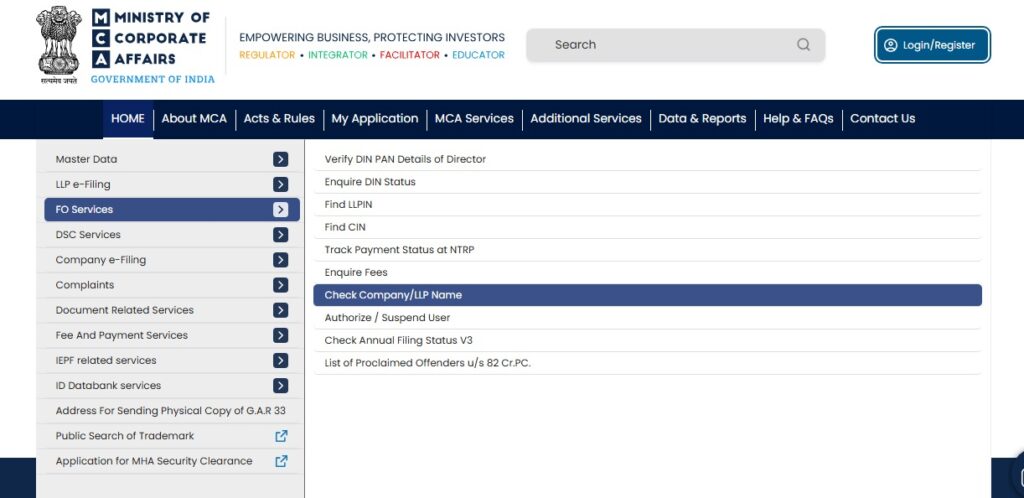
Step 3 — Enter your proposed name
Type only the main keyword of your name — for example, enter “Mohit” if you want “Mohit Chemicals Private Limited”. Do not add suffixes like “Private Limited”, “Limited” or “LLP” at this stage, as they only clutter the results.
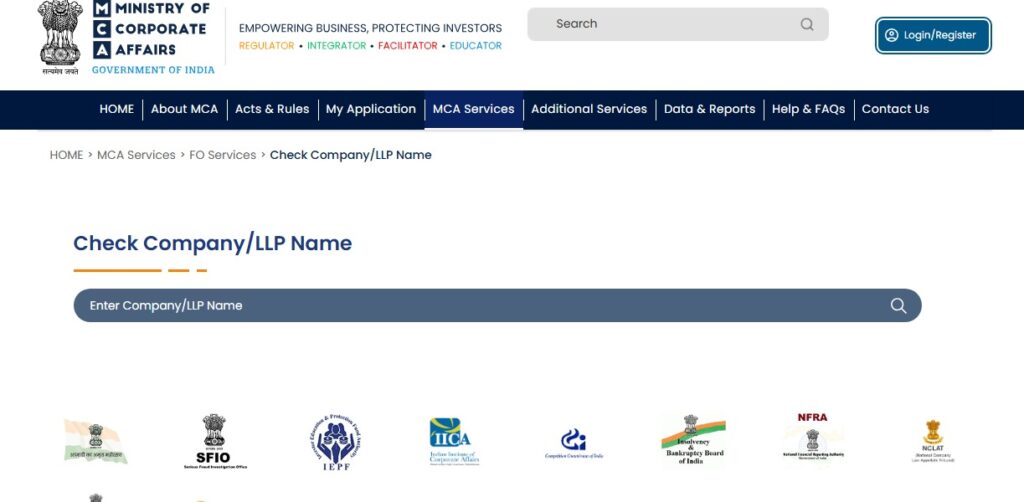
Step 4 — Review the search results
The tool shows existing names that match or resemble what you typed. Read the list carefully for exact matches and close look-alikes (more on how to judge this in the next section).
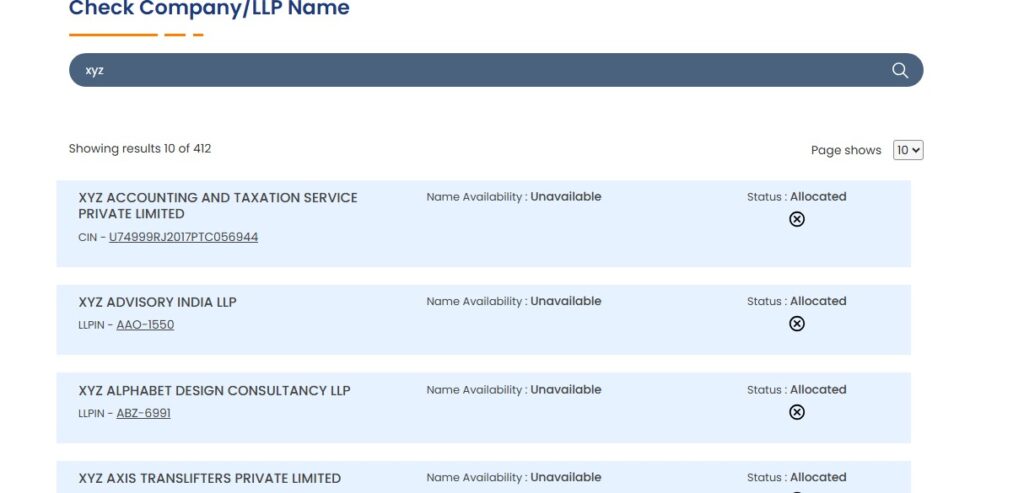
Step 5 — Refine and search again if needed
If you spot a conflict, adjust the name — change a word, add a distinctive coined term, or drop a common word — and run the MCA name search again until the result looks clear.
Step 6 — Confirm before you reserve
Only move ahead to reserve the name (through RUN or SPICe+ Part A) once your company name check comes back clean. This one habit avoids most first-round rejections.
How to read your MCA name search results
The tool shows you names — but it’s your judgement that matters. Say you search “Nimbus Tech”. The results might include:
- Nimbus Technologies Private Limited — strong conflict; almost certain to be refused.
- Nimbus Consulting LLP — possible conflict, depending on how close it looks and sounds.
- Nimbusverse Solutions Private Limited — likely fine, because it’s clearly distinct.
If a close match shows up, revise your name to something clearly different, such as “NimbusEdge Solutions”.
The “identical or too nearly resembling” test
The ROC doesn’t only reject exact copies. Under the naming rules, a name that too nearly resembles an existing one is also refused. That includes small spelling tweaks and similar-sounding names. A classic example: since “Flipkart” exists, “Flipcart” would still be rejected, even though the spelling differs. So aim for genuinely distinct, not just slightly changed.
MCA company naming rules for 2026
Your name has to follow the Companies (Incorporation) Rules, 2014. Keep these in mind so your MCA name check translates into an approval:
Words that need prior approval
Some words suggest government backing, regulation or scale and can’t be used freely. Words like National, Bank, Insurance, Stock Exchange, Government or Federal usually need special approval or a licence before they’ll be accepted.
Use the correct ending
A private company name must end with “Private Limited”, a public company with “Limited”, and an LLP with “LLP” or “Limited Liability Partnership”. You don’t type these into the search box, but your final name must carry the right suffix.
Names that get refused outright
Avoid names that are identical to an existing company or registered trademark, that are misleading about your activity, or that use offensive or prohibited terms. A name should also connect sensibly to what your business actually does.
How to reserve your company name (RUN vs. SPICe+ Part A)
Once your name is clear, reserve it so no one else can take it while you prepare your documents. There are two routes.
RUN (Reserve Unique Name)
RUN is a simple, standalone way to book a name. Log in to the MCA portal, open the RUN service, enter your proposed name (you can submit up to two), add a short line about your business activity, and pay the government fee of ₹1,000. The MCA then approves the name or asks you to resubmit.
SPICe+ Part A
SPICe+ is the integrated incorporation form. Part A handles name reservation, and Part B handles the actual registration (DIN, PAN, TAN, EPFO/ESIC and more). If you’re incorporating a brand-new company, reserving through SPICe+ Part A keeps everything in one workflow. You’ll also need a Class 3 Digital Signature Certificate (DSC) to sign the forms when you file.
RUN or SPICe+ Part A — which should you use?
| RUN | SPICe+ Part A | |
| Best for | Reserving a name early, or a name change for an existing company | New companies incorporating right away |
| Login needed | Yes (registered user) | Yes (registered/business user) |
| Links to incorporation | No — name only | Yes — flows into SPICe+ Part B |
| Fee | ₹1,000 | ₹1,000 |
How long is an approved name reserved?
This trips up a lot of founders, so note the difference:
- New company: the approved name is reserved for 20 days from the date of approval. You must complete incorporation within this window.
- Existing company changing its name: the name is reserved for 60 days from approval.
If you don’t act within the period, the reservation lapses and you’ll have to apply again.
What if your company name is already taken
If your first choice clashes with an existing name, it isn’t the end of the road:
- You typically get one resubmission to offer a corrected or alternative name within the allowed period.
- If both proposed names are rejected, you’ll need to file a fresh application with a new ₹1,000 fee.
- The simplest fix is usually to add a distinctive, coined word or change the core term so the name is clearly your own.
Common reasons MCA rejects company names
- Identical or too similar to an existing company or LLP.
- Too close to a well-known registered trademark.
- Restricted words used without the required approval.
- Misleading name that doesn’t match the business activity.
- Offensive, illegal or vague/abbreviation-heavy names.
- Wrong or missing suffix for the entity type.
Don’t skip the trademark check
Here’s the step most founders miss: a clean MCA name check does not mean your name is trademark-safe. The MCA only confirms that no identical company or LLP name exists — it doesn’t check the trademark register.
A name approved by the MCA can still infringe a mark protected under the Trade Marks Act, 1999, and the trademark owner can object or take action later. So run a quick search on the IP India portal (ipindia.gov.in) as well, and ideally check that a matching domain and social handles are free. If your name is central to your brand, it’s worth securing a trademark registration too. Think of it as a triple-check: MCA, trademark, and domain.
Tips to get your name approved on the first try
- Choose a distinctive or coined word rather than a generic, common term.
- Make sure the name reflects what your business actually does.
- Avoid abbreviations and vague strings unless you can justify them.
- Keep two solid options ready, so a resubmission is quick if needed.
- Do the triple-check — MCA name search, trademark, and domain — before you reserve.
Want your name approved without the back-and-forth?
LegalJini’s Company Secretaries and legal experts handle name searches, RUN/SPICe+ reservation and full company incorporation — checking MCA and trademark records together so your name clears on the first attempt. We’ve supported startups, MSMEs and global companies in India for over 20 years.
Frequently asked questions
Is the MCA name check free?
Yes. The MCA “Check Company/LLP Name” tool is completely free, and you can run as many searches as you like without logging in.
Can I check company and LLP names together?
Yes. On the MCA V3 portal, a single MCA name search now covers both company and LLP names, so you see the full picture at once.
How many names can I submit for reservation?
Through the RUN service you can submit up to two proposed names in one application.
How long is an approved name reserved?
For a new company, the approved name is reserved for 20 days from approval. For an existing company changing its name, it is reserved for 60 days.
What happens if both my proposed names are rejected?
You usually get one resubmission within the allowed period. If that is also rejected, you file a fresh application with a new ₹1,000 fee.
Does MCA approval mean my name is trademark-safe?
No. The MCA only confirms the company/LLP name isn’t already taken. You should separately search the IP India trademark database to be sure your name doesn’t infringe an existing mark.
Do I need a DSC just to check a company name?
No. A company name check on the MCA portal needs no login or DSC. You’ll only need a Class 3 DSC later, to sign the forms when you reserve the name and file for incorporation.